What fields can I ignore in the Engagement Properties ’NameAddress’ screen?
The Engagement
Properties provides information about the client that is pertinent to the
functioning of the engagement file.
However not all fields are required to be filled out by the user.
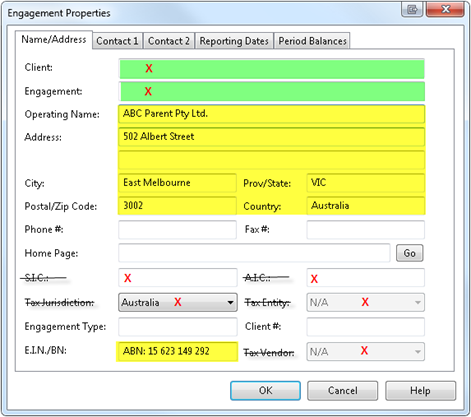
Below are the required fields for all engagement files:
However not all fields are required to be filled out by the user.
Below are the required fields for all engagement files:
- Operating
Name: This
is the client’s name which you want to publish on all
Automatic, CaseView and Internal Image documents.
- Address
/ City / Post Code / State / Country: This
is the client’s address which gets published in the Financial Statements
and some Audit Workpapers.
- E.I.N.
/BN: This
is the client’s ABN number which gets published in the Financial
Statements.
Below are the fields not required for all engagement files:
- Client
/ Engagement: If you are integrating information from CaseWare Time,
this field is used to select the applicable project in Time that this
engagement refers to. These fields are often ignored (not required) by our
users.
- Phone
# / Fax # / Home Page / Engagement Type / Client #: These
fields are for your internal reference only.
- S.I.C.
/A.I.C. / Tax Jurisdiction / Tax Entity / Tax Vendor: These
fields are tax fields used in other jurisdictions and are not used in
Australia.